

 De
De  Es
Es  Fr
Fr  Pt
Pt 

-
-
-
-
-
Serach Field
-
-
-
-
-
-
-
-
-
-
-
-
-
-
-
-
-
-
-
-
-
-
-
-
-
-
-
-
-
-
-
-
-
-
-
-
-
-
-
-
-
-
-
-
Serach Field
In dialogs and toolbars, the Search field in the upper right part is intended for quick searching of objects by name. For example, LAYERS, LAYERSQUICK, COVERINGBROWSER:
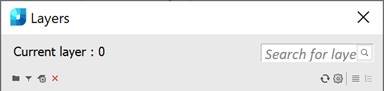

To replace a part of a word, use the special symbol * (asterisk). For example:
· vie* – to display objects starting with “vie”;
· *vie – to display objects ending with “vie”;
· *ie* – to display objects with “ie” in the middle;
· vi*w – to display objects starting with “vi” and ending with “w”.
You can also use the following special symbols in the field:
|
Symbol |
Matching characters in name |
|
? Question mark |
Any single character. |
|
# Hash sign |
Any single figure. |
|
@ Commercial at |
Any single letter. |
|
. Dot |
Any single character other than a letter or a figure. |
|
~ Tilde |
Any sequence of characters other than the one after the tilde. |
|
[ ] Square brackets |
Any single character from those inside the brackets. |
|
[~] Tilde in square brackets |
Any single character other than those inside the brackets. |
|
[-] Dash in square brackets |
Any single character from the range starting with the character to the left of the dash and ending with the character to the right of the dash. |
|
` Backtick |
A backtick indicates that the character following it is a regular character and not a special character. |
The  Clear field button resets the search results.