

 De
De  Es
Es  Fr
Fr  Pt
Pt 

-
-
-
-
-
-
-
-
-
-
-
-
-
-
-
-
-
-
-
-
-
-
-
-
-
-
-
-
Convert Text to Multiline Text
-
-
-
-
-
-
-
-
-
-
-
-
-
-
-
-
-
-
-
-
-
-
-
-
-
-
-
Convert Text to Multiline Text
 Ribbon: Annotate – Text >
  Convert Text to Multiline Text
Menu: Modify – Advanced Tools > Convert text to Multiline Text
 Command line: TEXT2MTEXT, T2MT
The command converts the single-line (TEXT) and multiline (MTEXT) text objects to the multiline text.
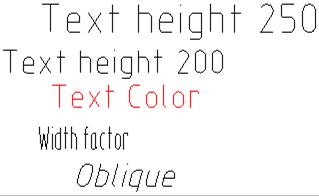
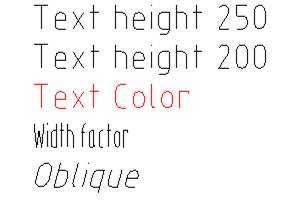
After conversion, values of the height, color, width factor and oblique of text objects are saved in the multiline text:
|
Before conversion |
After conversion |
|
|
|
Command options:
|
? |
Calls additional options to select the objects. |
|
Settings |
Opens the Text to mtext conversion options dialog box. |
Command prompts:
|
Select text objects or [?/Settings]: |
Select the Settings option and in the dialog box that opens, specify the settings for converting texts. Click OK. |
|
Select text objects or [?/Settings]: |
Select the text objects. Press ENTER to finish the command. |
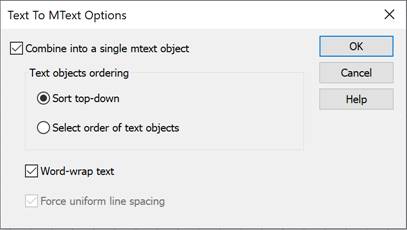
Text to MText Option dialog box
Options
|
Parameters |
Description |
|
Combine into a single mtext object |
Enables/disables the mode for combining texts into one multiline text object: · when this mode is enabled, all selected text objects will be replaced by a single multiline text object; · when this mode is disabled, single-line text objects will be converted to multiline ones. |
|
Text objects ordering |
Selects a method for arranging texts: · Sort top-down; · Select order of text objects. The parameter is available when the Combine into a single mtext object mode is enabled. |
|
Word-wrap text |
Enables/disables word wrap mode: if the text length is greater than the width of the multiline text object, part of the text is wrapped to the next line. The parameter is available when the Combine into a single mtext object mode is enabled. |
|
Force uniform line spacing |
Enables/disables the mode for changing line spacing and paragraph spacing. The parameter is available when the Combine into a single mtext object mode is enabled and Word-wrap text mode is disabled. |