De
De  Es
Es  Fr
Fr  Pt
Pt 

-
-
-
-
-
-
-
-
-
-
-
-
-
-
-
-
-
-
-
-
-
-
-
-
-
-
-
-
-
Baseline Dimension
-
-
-
-
-
-
-
-
-
-
-
-
-
-
-
-
-
-
-
-
-
-
-
-
-
-
Baseline Dimension
 Ribbon: Home, Annotate – Dimensions >
  Baseline
Menu: Dimensions –  Baseline
Toolbar: Utilities, Dimensions –
Context menu when calling any dimension: Base
 Command line: DBA, DIMBASELINE, CHAINBASE
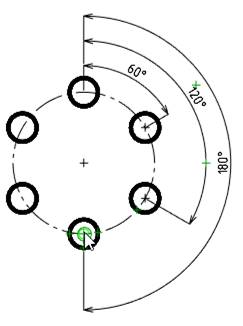
Baseline dimensions are a sequence of dimensions measured from one base point.
Baseline dimensions can be linear, ordinate or angular.
Before constructing baseline dimensions, at least one linear, ordinate or angular dimension must be applied to the object.
To construct linear baseline dimensions:
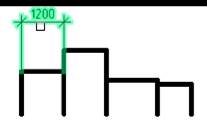
1. Select the specified dimension as a base (the dimension from which the linear dimensions will begin to form):
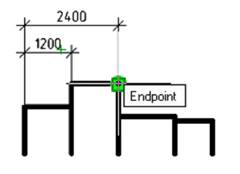
2. Set the end point of the first dimension:
3. Set the end points of the remaining dimensions in sequence, press ENTER to complete the command:
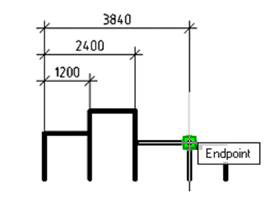
Each new dimension is placed at a specified distance from the previous one. The dimension offset value is set by the Baseline spacing parameter in the Lines tab of the Modify Dimension Style dialog.
To construct ordinate baseline dimensions:
Ordinate base dimensions are constructed similarly to constructing ordinate dimensions.
1. Select the specified dimension as a base (the dimension from which the ordinate dimensions will begin to form):
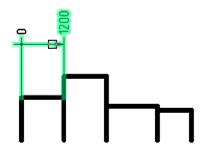
2. Set the end point of the first dimension:
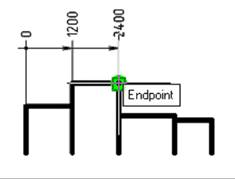
3. Set the end points of the remaining dimensions in sequence, press ENTER to complete the command:
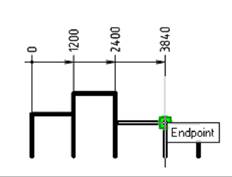
To construct angular baseline dimensions:
1. Select the specified dimension as a base (the dimension from which angular dimensions will start to form):
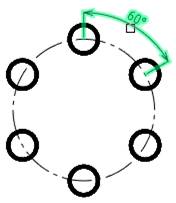
2. Set the end point of the first dimension:
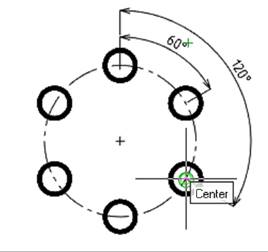
3. Set the end points of the remaining dimensions in sequence, press ENTER to complete the command: