


 De
De  Es
Es  Fr
Fr  Pt
Pt 

-
-
-
-
-
-
-
-
-
-
-
-
-
-
-
-
-
-
-
-
-
-
-
-
-
-
-
-
Text Style Dialog
-
-
-
-
-
-
-
-
-
-
-
-
-
-
-
-
-
-
-
-
-
-
-
-
-
-
-
Text Style Dialog
 Command line: TEXTPROPSCMDCLASSIC
The command opens the classic version of the Text Style dialog, which is used for compatibility with previous versions of the program.
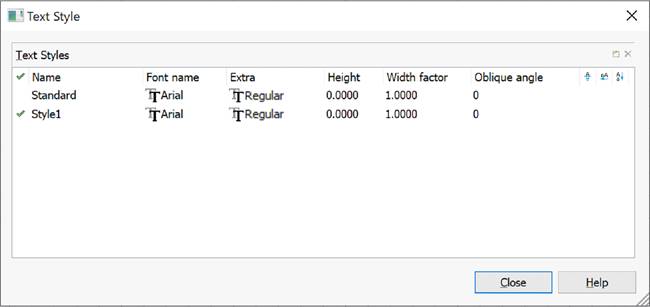
Options:
|
|
Creates a new text style. |
|
|
Deletes the selected text style. |
|
|
Sets the selected text style as current. |
|
Name |
Name of the text style. |
|
Font name |
Drop-down list to select the font file specifying the symbol shape. |
|
Extra |
Drop-down list to select the font symbols shape. |
|
Height |
Field to enter character height. |
|
Width factor |
Field to enter the characters’ width factor (values from 0,1 to 10). |
|
Oblique angle |
Field to enter the oblique angle for characters (values from -85 to 85). |
|
|
Enables/Disables character display mode upside down. |
|
|
Enables/Disables character display mode from right to left. |
|
|
Enables/Disables vertical text writing mode. The vertical text writing mode is available if it is supported by the selected font file. |


Some commands are also available in the context menu, which is called by right-clicking in the text style list field :
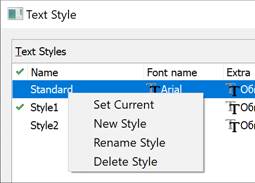
To create a text style:
1. Click to select the text style on the basis of which the new style should created (the disabled  Add new style button becomes available).
2. Click the Add new style button. A new style named "Style1" will be created.
3. To rename the created style, double-click the text style name, enter your own name and press ENTER.
4. Select the font file from the drop-down list.
5. Set the remaining font parameters (height, font shape, angle, etc.).
6. To set the created text style as current, double-click in the leftmost field opposite the text style. Moving the  checkbox to this field indicates that the style is set as current
7. Click the Close button to exit the dialog.
To delete a text style:
1. Click the text style to be deleted (the disabled  Delete style button will become available).
2. Click the Delete style button or select the Delete command from the context menu (the style you select to delete should not be the current one).
3. Click the Close button to exit the dialog.