


 De
De  Es
Es  Fr
Fr  Pt
Pt 

nanoCAD Platform Help
-
-
-
-
-
-
-
-
-
-
-
-
-
-
-
-
-
-
-
-
-
-
-
-
-
-
-
Saving an External Reference as a Raster
-
-
-
-
-
-
-
-
-
-
-
-
-
-
-
-
-
-
-
-
-
-
Saving an External Reference as a Raster
To save a reference as a raster:
1. Select an external reference to a raster image in the External References toolbar.
2. Open the context menu, select the Save As… command.
3. In the Save Image File dialog box that opens, specify a file name, if necessary, select the file type:
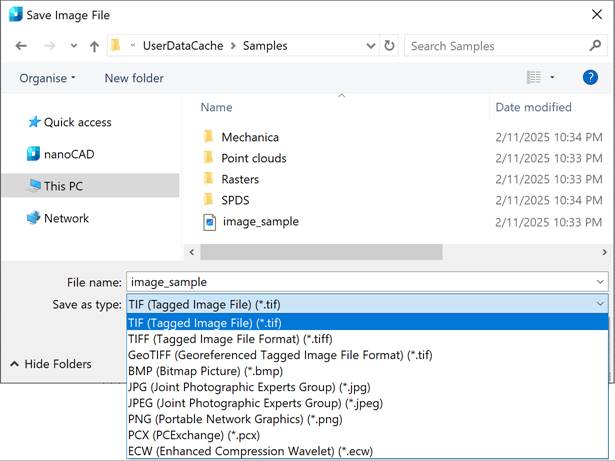
4. Click the Options… button.
5. Depending on the selected file type, a dialog will open: TIFF Options, JPEG Options, or ECW Options. In the format settings window, set the required save options. Click OK button.
6. Click the Save button.