


 De
De  Es
Es  Fr
Fr  Pt
Pt 

-
-
-
-
-
-
-
-
-
-
-
-
-
-
-
-
-
-
-
-
Quadrangle
-
-
-
-
-
-
-
-
-
-
-
-
-
-
-
-
-
-
-
-
-
-
-
-
-
-
-
Quadrangle
 Ribbon: Home, Draw – Draw – Quadrangle
Menu: Draw – Quadrangle
Toolbr: Draw – 
 Command line: CQUAD
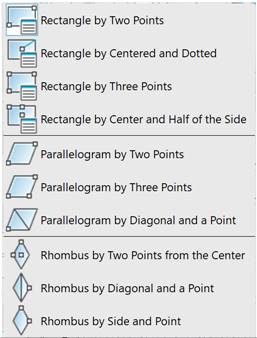
The command allows you to construct quadrangles of different types using different methods:
When you start the command, the Extended Properties functional bar appears:
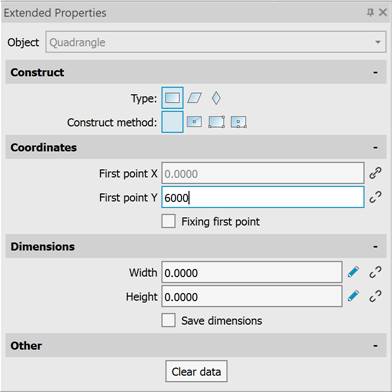
To construct a quadrangle, specify the following properties:
· quadrangle type – rectangle, parallelogram, or rhombus;
· construct method;
· coordinates and/or dimensions of the quadrangle. The coordinates and dimensions of the quadrangle can be indicated on the screen using the mouse cursor or entered as values in the corresponding fields. Entered values can be fixed by checking the appropriate boxes: Fixing first point, Fixing second point, Save dimensions: –  value fixed, –
  value not fixed. To specify the dimensions of the quadrangle on the screen using the mouse cursor, click the
  button;
· quadrangle partitioning option:
· Lines (default) – the created quadrangle consists of line segment objects;
· Polyline – the created quadrangle is a flat closed polyline;
· No the created quadrangleis a Quadrangle object.
The quadrangle properties can be specified via the command line.
Command options:
|
FigType |
Selects a quadrangle type: Rectangle, Parallelogram, RHomb. |
|
ConstructMethod |
Selects a construction method (depending on the quadrangle type). |
|
ClearData |
Reset previously entered coordinates and/or dimensions |
|
SaveDims |
Fixes previously entered coordinates and/or dimensions. |
|
Width |
Specifies width. |
|
Height |
Specifies height. |
|
Angle |
Specifies angle. |
|
AngleToX |
Specifies rotation angle. |
|
DiagLength1 |
Specifies the length of the first diagonal. |
|
DiagAngleToX1 |
Specifies the rotation angle of the first diagonal. |
|
DiagLength2 |
Specifies the length of the second diagonal. |
|
DiagAngleToX2 |
Specifies the rotation angle of the second diagonal. |
|
LengthSide |
Specifies side length. |
Command prompts:
|
Specify point or [FT-FigType/ CM-ConstructMethod/CD-ClearData/ SD-SaveDims/W-Width/H-Height]: |
Specify the first point of the quadrangle or select a command option. |
|
Speicfy next point or [FT-FigType/ CM-ConstructMethod/CD-ClearData/ SD-SaveDims/W-Width/H-Height]: |
Specify the next point of the quadrangle or select a command option. |