


 De
De  Es
Es  Fr
Fr  Pt
Pt 

-
-
-
-
-
-
-
-
-
-
-
-
-
-
-
-
-
-
-
-
PolygonPlus
-
-
-
-
-
-
-
-
-
-
-
-
-
-
-
-
-
-
-
-
-
-
-
-
-
-
-
PolygonPlus
 Ribbon: Home, Draw –Draw >
  PolygonPlus
Menu: Draw – PolygonPlus > PolygonPlus
Toolbar: Draw –
 Command line: CPOLYGON
The command allows you to construct three types of polygons: circumscribed polygon, inscribed polygon, star.
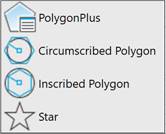
When you start the command, the Extended Properties bar appears:
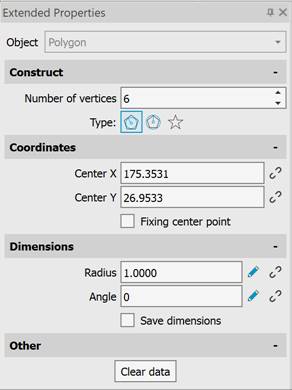
To construct a polygon, specify the following properties:
· number of vertices;
· polygon type: circumscribed polygon, inscribed polygon, star;
· coordinates of the center point;
· polygon dimensions.
Coordinates and dimensions can be specified on the screen with the mouse cursor or entered as values in the corresponding fields. Entered values can be fixed by checking the corresponding box to the right of the field:  - fixed value;
  - not fixed value. To specify dimensions on the screen with the mouse cursor, click the
  button.
Polygon properties can be set via the command line.
|
CPOLYGON command options |
Description |
|
T-Type |
Selects a polygon type: Circumscribed, Inscribed, Star. |
|
NV-NumVerts |
Specifies the number of vertices (rays). |
|
R-Radius |
Specifies the radius (for circumscribed and inscribed polygons). |
|
R-Radisu1 |
Specifies the inner radius (for a star). |
|
RA-Radisu2 |
Specifies the outer radius (for a star). |
|
A-Angle |
Specifies the rotation angle of the polygon relative to the positive X-axis. |
|
SD-SaveDims |
Saves previously entered coordinates and/or dimensions. |
|
CD-ClearData |
Resets previously entered coordinates and/or dimensions. |