


 De
De  Es
Es  Fr
Fr  Pt
Pt 

-
-
-
-
-
-
-
-
-
-
-
-
-
-
-
-
-
-
-
-
Inscribed Polygon
-
-
-
-
-
-
-
-
-
-
-
-
-
-
-
-
-
-
-
-
-
-
-
-
-
-
-
Inscribed Polygon
 Ribbon: Home, Draw – Draw – PolygonPlus >
  Inscribed Polygon
Menu: Draw – PolygonPlus > Inscribed Polygon
Toolbar: Draw –  >
>
 Command line: CPOLYGONINSCRIBED
The command allows you to construct a polygon inscribed in a circle. The center of the polygon coincides with the center of the circle, and the vertices lie on the circle.
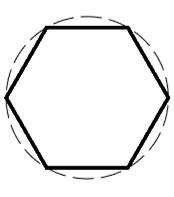
Command prompts:
|
Specify point or [T-Type/NV-NumVerts/R-Radius/A-Angle/SD-SaveDims/CD-ClearData]: |
Specify the center point of the polygon. |
|
Specify next point or [T-Type/NV-NumVerts/R-Radius/A-Angle/SD-SaveDims/CD-ClearData]: |
Specify the second point, defining the radius of the circle in which the polygon will be inscribed. You can specify the radius using the R-Radius option. |
|
|
Select the NV-NumVerts option. |
|
Specify the number of vertices of the polygon: |
Specify the number of vertices of the circumscribed polygon. |
|
|
Select the A-Angle option. |
|
Specify dimension on space: |
Specify the rotation angle of the circumscribed polygon in degrees. |