


 De
De  Es
Es  Fr
Fr  Pt
Pt 

nanoCAD Platform Help
-
-
-
-
-
-
-
-
-
-
-
-
-
-
-
-
-
-
-
-
-
-
-
-
-
-
-
-
-
-
-
-
-
-
-
-
-
-
Extracting the Mesh Boundary
-
-
-
-
-
-
-
-
-
-
-
-
-
-
-
Extracting the Mesh Boundary
 Ribbon: Topoplan – Utilities >
  Extracting the Mesh Boundary
Menu: Topoplan – Utilities >  Extracting the Mesh Boundary
Toolbar: Topoplan Utilities >  Extracting the Mesh Boundary
 Command line: NG_MESH_GET_BOUNDARY
The command is designed to select external and internal contours of surfaces.
When running the command, select Mesh, Polyface Mesh or TIN Surface in the drawing, specify the settings in the Properties bar and press ENTER. The boundaries will be created as 3D polylines.
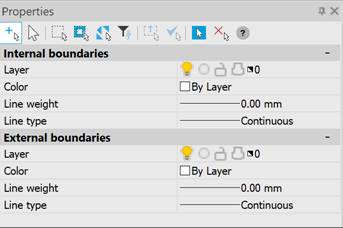
This command is needed to select external and internal contours of surfaces. Surfaces can have breaks, respectively have many external and internal contours.