


 De
De  Es
Es  Fr
Fr  Pt
Pt 

nanoCAD Platform Help
-
-
-
-
-
-
-
-
-
-
-
-
-
-
-
-
-
-
-
-
-
-
-
-
-
-
-
-
-
-
-
-
-
-
-
-
-
-
Creating Contour Lines from Objects
-
-
-
-
-
-
-
-
-
-
-
-
-
-
-
Creating Contour Lines from Objects
 Ribbon: Topoplan – Relief >
  Creating Contour Lines from Objects
Menu: Topoplan – Relief > Creating Contour Lines from Objects
Toolbar: Relief > Creating Contour Lines from Objects
 Command line: NG_MARK_AS_CONTOUR
The command converts polylines and 3D polylines into contours.
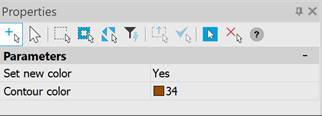
The command parameters are set in the Properties bar.
|
Set new color |
The default value is No. The color of the created contours will be taken from the object. If Yes is selected, the Contour color parameter appears. |
|
Contour color |
Selecting the contour color. |