


 De
De  Es
Es  Fr
Fr  Pt
Pt 

-
-
-
-
-
-
-
-
-
-
-
-
-
-
-
-
-
-
-
-
Constructing a Parallelogram by Diagonal and a Point
-
-
-
-
-
-
-
-
-
-
-
-
-
-
-
-
-
-
-
-
-
-
-
-
-
-
-
Constructing a Parallelogram by Diagonal and a Point
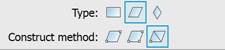
 Ribbon: Home, Draw – Draw – Quadrangle >
  Parallelogram by Diagonal and a Point
Menu: Draw – Quadrangle >  Parallelogram by Diagonal and a Point
Toolbar: Draw –  >
>
 Command line: CQUAD_PAR_DIAG, QPARDIAGP, QPARALLELOGRAMDIAGPNT
The command to construct a parallelogram using diagonal and a point.
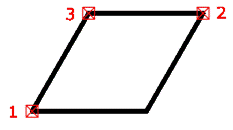
Command prompts:
|
Specify point or [FT-FigType/CM-ConstructMethod/DL-DiagLength1/DAX-DiagAngleToX1/DIL-DiagLength2/DIAX-DiagAngleToX2/SD-SaveDims/CD-ClearData]: |
Specify the first point of the parallelogram (point 1). |
|
Specify next point or [FT-FigType/CM-ConstructMethod/DL-DiagLength1/DAX-DiagAngleToX1/DIL-DiagLength2/DIAX-DiagAngleToX2/SD-SaveDims/CD-ClearData]: |
Specify the second point of the parallelogram along the diagonal (point 2). |
|
Specify next point or [FT-FigType/CM-ConstructMethod/DL-DiagLength1/DAX-DiagAngleToX1/DIL-DiagLength2/DIAX-DiagAngleToX2/SD-SaveDims/CD-ClearData]: |
Specify the third point of the parallelogram (point 3). |
|
|
Select option DiagLength1/ DiagLength2. |
|
Specify dimension on space: |
Specify points to define the length of the parallelogram’s diagonal or enter the length value. |
|
Second point: |
Specify the second point to define the length of the parallelogram’s diagonal. |
|
|
Select option DiagAngleToX1/ DiagAngleToX2. |
|
Specify dimension on space: |
Specify the first point to define the rotation angle of the parallelogram’s diagonal or enter the angle value in degrees. |
|
Second point: |
Specify the second point to define the rotation angle of the parallelogram’s diagonal. |