


 De
De  Es
Es  Fr
Fr  Pt
Pt 

-
-
-
-
-
-
-
-
-
-
-
-
-
-
-
-
-
-
-
-
Circumscribed Polygon
-
-
-
-
-
-
-
-
-
-
-
-
-
-
-
-
-
-
-
-
-
-
-
-
-
-
-
Circumscribed Polygon
 Ribbon: Home, Draw – Draw – PolygonPlus >
  Circumscribed Polygon
Menu: Draw – PolygonPlus > Circumscribed Polygon
Toolbar: Draw –  >
>
 Command line: CPOLYGONCIRCUMSCRIBED
The command allows you to construct a polygon circumscribed around a circle. The center of the polygon coincides with the center of the circle, and the distance from the center to any side is equal to the radius of the circle.
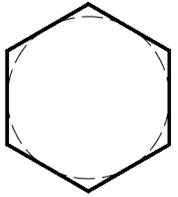
Command prompts:
|
Specify point or [T-Type/NV-NumVerts/R-Radius/A-Angle/SD-SaveDims/CD-ClearData]: |
Specify the polygon center point. |
|
Specify next point or [T-Type/NV-NumVerts/R-Radius/A-Angle/SD-SaveDims/CD-ClearData]: |
Specify the second point, which defines the radius of the circle around which the polygon will be circumscribed. You can specify the radius using the R-Radius option. |
|
|
Select the NV-NumVerts option. |
|
Specify the number of vertices of the polygon: |
Specify the number of vertices of the circumscribed polygon. |
|
|
Select the A-Angle option. |
|
Specify dimension on space: |
Specify the rotation angle of the circumscribed polygon in degrees. |