

 De
De  Es
Es  Fr
Fr  Pt
Pt 

-
-
-
-
-
-
-
-
-
-
-
-
-
-
-
-
-
-
-
-
-
Circle
-
-
-
-
-
-
-
-
-
-
-
-
-
-
-
-
-
-
-
-
-
-
-
-
-
-
Circle
 Ribbon: Home, Draw – Draw – Circle >
  Center, Radius
Menu: Draw – Circle >  Center, radius
Toolbar: Draw –
 Hotkeys: CTRL+ALT+C
Command line: C, CIRCLE
Command options:
|
3P |
Circle by three points lying on the circle. |
|
2P |
Circle by two points lying on the diameter. |
|
TTR |
Circle by two tangents and radius. |
|
3T |
Circle by three tangents. |
|
Diameter |
Circle by center and diameter. |
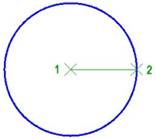
Command prompts:
|
Specify center point of circle or [3P/2P/TTR]: |
Specify center (point 1). |
|
Specify radius: |
Specify radius of circle (point 2). |
Circle by Two Tangents and Radius
Ribbon: Home, Draw – Draw – Circle >  Tan, Tan, Radius
Menu: Draw – Circle >  Two Tangents, Radius
Toolbar: Draw –
Command line: CIRCLEBYTTR
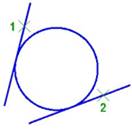
Command prompts:
|
Specify a point on first tangent object: |
Select a first tangent object (point 1). |
|
|
Specify a point on second tangent object: |
Select a second tangent object (point 2). |
|
|
Specify radius: |
Specify radius of circle. |
|
|
|
Note |
|
|
|
The object for the tangent cannot be infinite lines (rays or straight lines). |
|
