De
De  Es
Es  Fr
Fr  Pt
Pt 

nanoCAD Platform Help
-
-
-
-
-
-
-
-
-
-
-
-
-
-
-
-
-
-
-
-
-
-
-
-
-
-
-
-
-
-
-
-
-
-
-
-
-
-
-
Checking the Surface
-
-
-
-
-
-
-
-
-
-
-
-
-
-
Checking the Surface
 Ribbon: Topoplan – Texturing and Calculations >
  Checking the Surface
Menu: Topoplan – Calculations > Checking the Surface
Toolbar: Texturing and Calculation > Checking the Surface
 Command line: NG_COLOR_EDGES_GREATER
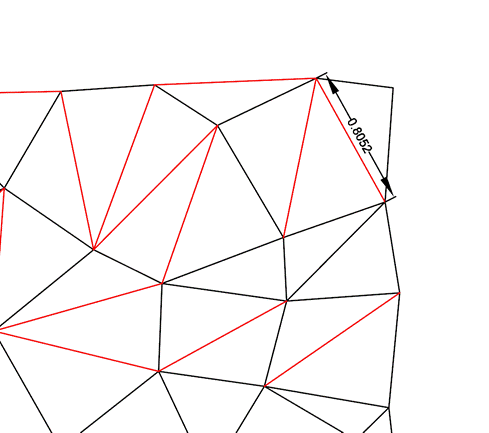
This command analyzes the Mesh object for edges in the triangulation mesh that exceed a specified value.
Command prompts:
Select mesh or [?]:
Specify the Mesh object in the drawing
Max Length Edge:
Specify a triangulation mesh edge length value in the command line (or in the dynamic input field). Red line segments will be created highlighting the edges of triangles that exceed the specified value.