


 De
De  Es
Es  Fr
Fr  Pt
Pt 

-
-
-
-
-
-
-
-
-
-
-
-
-
-
-
-
-
-
-
-
-
-
-
-
-
-
-
-
-
Angle Ordinate Dimension
-
-
-
-
-
-
-
-
-
-
-
-
-
-
-
-
-
-
-
-
-
-
-
-
-
-
Angle Ordinate Dimension
 Ribbon: Home, Annotate - Dimensions >
  Angle ordinate
Menu: Dimensions –  Angle ordinate dimension
 Command line: dimaord
To set an angular ordinate dimension:
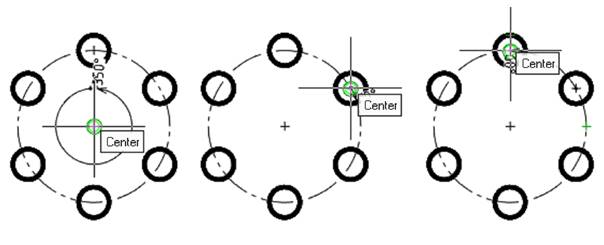
1. Create the first angular dimension. It will be used as a reference point. First, specify the center, then the extreme points of the angle:
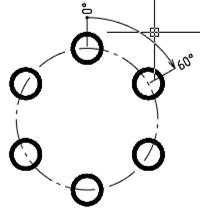
2. Select the location of the dimension. Left-click to fix the selected position:
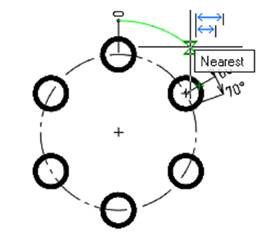
3. Place the mouse cursor over the angular dimension to highlight it dynamically. An auxiliary marker  appears. Left-click to confirm the selection:
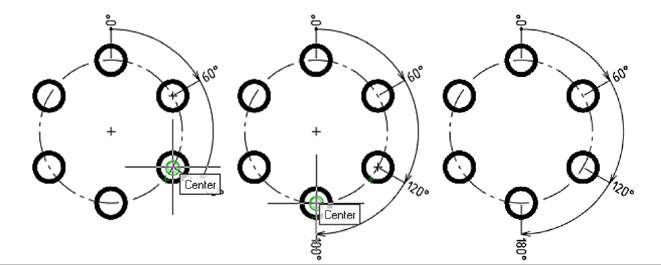
4. Build the following angular ordinate dimensions in sequence:
Smart Grips for Angular Ordinate Dimension
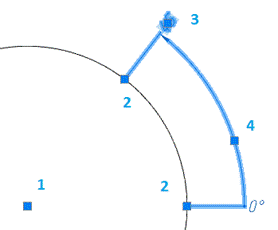
1. Dimension move grip.
2. Dimension endpoint grips.
3. Dimension extension line position and value grip.
4. Extension line position grip.