De
De  Es
Es  Fr
Fr  Pt
Pt 

-
-
-
-
-
-
-
-
-
-
-
-
-
-
-
-
-
-
-
-
-
-
-
-
-
-
-
-
Alignment of Text Objects Along the Line
-
-
-
-
-
-
-
-
-
-
-
-
-
-
-
-
-
-
-
-
-
-
-
-
-
-
-
Alignment of Text Objects Along the Line
 Ribbon: Annotation – Text >
  Text Alignment
Menu: Modify – Advanced Tools > Text alignment
 Command line: TEXTALIGN
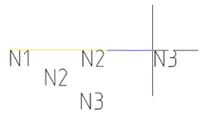
The command allows you to align multiple text objects (TEXT, MTEXT):
· horizontally,
· vertically,
· at an angle.
|
TEXTALIGN command options |
Description |
|
? |
Opens additional object selection options. |
|
Parameters |
Sets the parameters of the command application: · Distribute – evenly distributes text objects between two points; · Interval – distributes text objects at a specified distance (the spacing is specified between the boundaries of the text objects); · Vertical – distributes text objects relative to the selected object while maintaining their current vertical position; · Horizontal – distributes text objects relative to the selected object while maintaining their current horizontal position. |
|
Alignment |
Selects an alignment method: · TL – aligns the text object along the top and left edges; · TC – aligns the text object along the top edge and centers it horizontally; · TR – aligns the text object along the top and right edges; · ML – aligns the text object along the left edge and centers it vertically; · MC – centers the text object vertically and horizontally; · MR – aligns the text object along the right edge and centers it vertically; · BL – aligns the text object along the bottom and left edges; · BC – aligns the text object along the bottom edge and centers it horizontally; · BR – aligns the text object along the bottom and right edges. |
|
Point |
Specifies on the screen the first point of the line along which the aligned objects will be placed. |
|
TEXTALIGN command prompt |
Description |
|
Current settings: |
Outputs to the command line the current parameter settings and alignment method. |
|
Selecgt text objects to align or [?/Parametrs/Alignment]: |
Select the Parameters option if you want to change alignment settings, or select Alignment to change the alignment method. If you don't need to change any settings, select single-line and/or multi-line text objects. Press ENTER. Objects can be pre-selected before running the command. |
|
Select object to align to or [?/Point]: |
Select the base object on the screen—the text object to which all objects will be aligned. Press ENTER. Select the Point option if you want to specify a first point different from the starting point of the base object. |
|
Select second point or [Parameters/Alignment]: |
Specify the second point of the line along which the aligned objects will be placed. The command supports a preview so you can see the result before committing. Select the Parameters and/or Alignment options if you need to change the alignment settings. |
|
Select parameter: |
When you select Parameters > Interval, an additional prompt appears on the command line to specify the distance between text objects. |
To align multiple text objects in a drawing:
1. Run the command.
2. Select the Parameters option and specify the text object placement method: Distribute, Interval, Vertical or Horizontal.
3. Select the Alignment option and specify the alignment method: Top (left, center, right), Middle (left, center, right), Bottom (left, center, right).
4. Select the objects to align and press ENTER.
5. Select the base object or specify the first point of the line (Point option) relative to which the aligned objects will be placed.
6. Specify the second point of the line along which the aligned objects will be placed.
|
|
|
|
|
Selecting objects for alignment |
Selecting the second point (preview) |
Result of applying the text object alignment command |