

 De
De  Es
Es  Fr
Fr  Pt
Pt 

-
-
-
-
-
-
-
-
-
-
-
-
-
-
-
-
-
-
-
-
-
-
-
-
-
-
-
-
Arc Text
-
-
-
-
-
-
-
-
-
-
-
-
-
-
-
-
-
-
-
-
-
-
-
-
-
-
-
Arc Text
 Ribbon: Annotate - Text >
  Text for Arc…
Menu: Modify – Advanced tools > Text for Arc…
Toolbar: Text –
 Command line: ARCTEXT
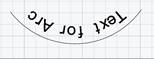
The command creates the Arc Text type object along the curve selected arc.
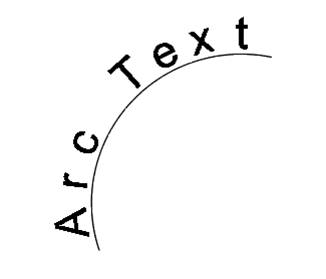
An arc text is associated with the arc along which it is built. It changes its position and stretch with the change in the length and curvature of the arc itself.
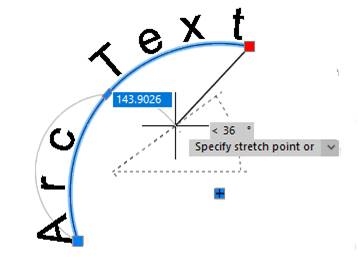
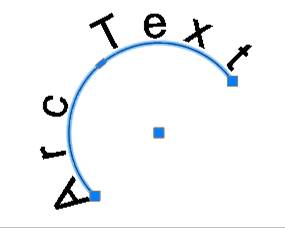
The arc text has its own grips that allow you to adjust the value of its offset above/below the arc and the offset along the arc from its left or right edge.
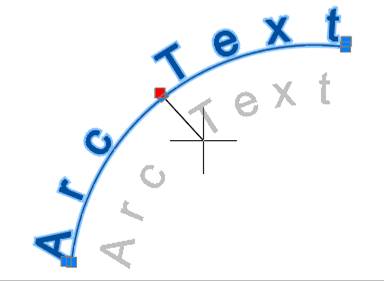
The arc text options can be edited in the Properties bar or in the Arc Aligned Text Settings dialog box, which opens by double-click on the object.
After running the Text for Arc command, specify the arc (Arc object (ARC)) along which the text should be placed.
After specifying the arc, the Arc Aligned Text Settings dialog box opens:
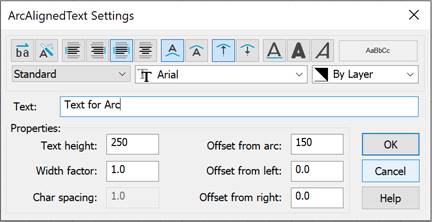
Options:
|
|
Drop-down list to select a text style. |
|
|
Drop-down list to select a font file that specifies the character style. |
|
|
Drop-down list to select the text color. |



Aligning text lines relative to the text area
|
|
Reverse text reading order |
Enables/disables reverse text reading order mode.
|
||||||||||||
|
|
Drag Wizard |
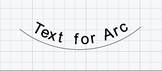
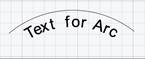
Enables/disables the mode of text binding relative to the arc when its curvature changes. If the mode is enabled, when the curvature of the arc changes, the text changes the parameters of location (
If the mode is disabled, the text does not change the parameters of location (
|
||||||||||||
|
|
Align left |
The text alignment mode to the left edge of the text area. |
||||||||||||
|
|
Align right |
The text alignment mode to the right edge of the text area. |
||||||||||||
|
|
Justified |
The text alignment mode to fit the width of the text area. |
||||||||||||
|
|
Align center |
The text alignment mode in the center of the text area. |
||||||||||||
|
|
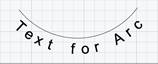
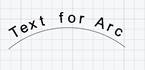
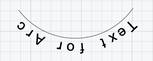
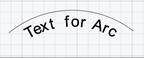
On convex side |
The button for positioning text on the outside of the arc.
|
||||||||||||
|
|
On concave side |
Button for positioning text on the inside of the arc.
|
||||||||||||
|
|
Outward from the center |
Button for positioning text so that its base is closer to the center of the arc, and its top is further away.
|
||||||||||||
|
|
Inward to the center |
Button for positioning text so that its top is closer to the center of the arc, and its bottom is further away.
|



 outside/
 inside the arc) and direction (
 from/
from/ to the center), at that maintaining the visual direction of the text.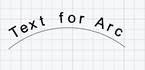






Text formatting
|
|
Underlined |
Enables/disables underlining of characters. |
|
|
Bold |
Enables/disables bold characters. The parameter is only available for TrueType fonts. |
|
|
Italic |
Enables/disables italic characters. The parameter is only available for TrueType fonts. |


Other parameters
|
Text height |
Field for entering character height. |
|
Width factor |
Field for entering character expansion or compression factor. Value 1 is the standard for the character width of the specified font. Values greater than 1 increase the character width, values less than 1 decrease it. |
|
Char spacing |
Field for entering character spacing. Values less than 1 decrease the spacing, values greater than 1 increase it. |
|
Offset from arc |
Field for entering the distance from the arc line to the nearest edge (top or bottom) of the text line. This parameter is also controlled by the central text grip. |
|
Offsdet from left |
Field for entering the indent of a text line from the left end of the arc. This parameter is also controlled by the left text grip. |
|
Offset from right |
Field for entering the indent of a text line from the right end of the arc. This parameter is also controlled by the right text grip. |