

 De
De  Es
Es  Fr
Fr  Pt
Pt 

-
-
-
-
-
-
-
-
-
-
-
-
-
-
-
-
-
Computing the Fractal Dimension
-
-
-
-
Computing the Fractal Dimension
 Ribbon: 3DScan > Features >
  Estimate the fractal dimension
 Menu: 3DScan > Features >
  Estimate the fractal dimension
Toolbar: Features 3DScan > Estimate the fractal dimension
 Command line: PC_COMPUTE_FRACTAL_DIMS
Fractal (fractional) dimension is an indicator that helps describe complex objects such as coastlines, mountain reliefs, clouds, or snowflakes. These objects have a complex structure that becomes more detailed as the scale increases. Classical parameters, such as length or area, are insufficient to accurately describe such shapes.
The command estimates the fractal dimension of each individual point in the point cloud. The estimation method is box counting. This is a method for computing the fractal dimension applicable to any fractal objects, regardless of their shape. The method is especially convenient for objects that do not have a strict self-similar structure, such as point clouds.
For points in the cloud, the number of points within spheres of different radii, centered at the point being estimated, is calculated. A linear regression is constructed from the obtained data, and the slope of the calculated line is the fractal dimension.
The command parameters are set in the Properties bar.
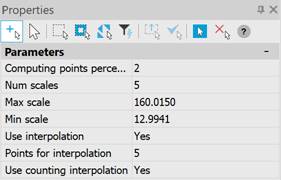
Parameters:
|
Computing points percentage |
The percentage of cloud points participating in the computing. |
|
Num scales |
The radii for which the number of points is calculated. |
|
Max scale |
Minimum number of radii. |
|
Min scale |
Maximum number of radii. |
|
Use interpolation |
Enables the use of interpolation. For each previously uncalculated point, interpolation points are taken from the nearest calculated neighbors. The weight of each neighbor is determined as 1.0 for the closest and 0.1 for the furthest, with the others in the range between them. Based on the obtained weights, a weighted average of the fractal dimensions of the nearest interpolation points is found. Interpolation of the final result by points occurs after the calculation. |
|
Points for inetrpolation |
Number of interpolation points. |
|
Use counting interpolation |
When this parameter is enabled, interpolation of the final result by points occurs during the calculation to reduce the execution time of the command. |