

 De
De  Es
Es  Fr
Fr  Pt
Pt 

Features Recognition and 3D Objects Creating
nanoCAD 3DScan allows you to use features – geometric forms (planes and pipes) recognized in a point cloud. Once found, features are saved in the document along with the cloud.
When recognizing parametric geometry in point clouds, data about this geometry is stored in the same data store as the cloud itself (npc file) and can be used in nanoCAD without vertical application. Thus, for example, outside of nanoCAD it becomes possible to:
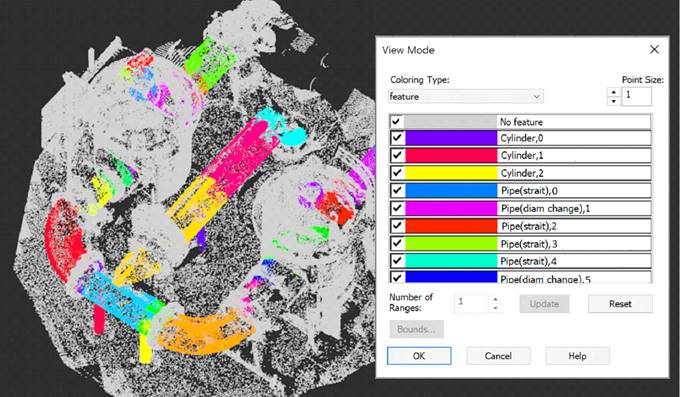
· Display the features by specifying the Shape or Shape type cloud coloring in the View Mode dialog. As a rule, switching to this type of display is done automatically after recognizing features.
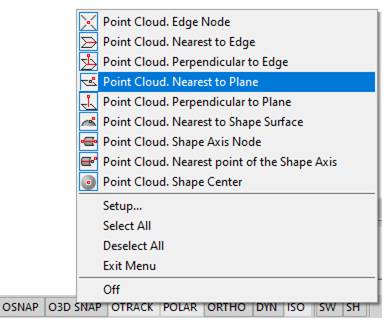
· Snap to fit points of features during objects creating and editing. In this case, it is enough to enable smart snaps - a set of specialized snaps that allow you to work with a snap to geometry elements recognized on point clouds and not yet vectorized.
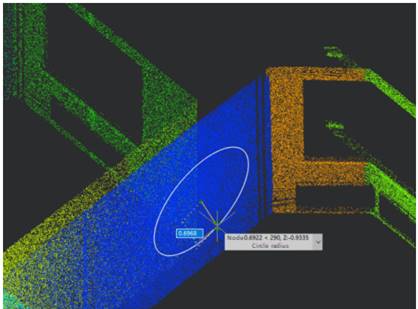
· Work in the planes of the recognized geometry in the dynamic UCS mode;
nanoCAD allows for additional manipulations with forms:
· Delete the recognized cloud forms (Deleting Forms command). For example, unnecessary or poorly recognized ones.
· Create 3D objects based on features (Creating Objects by Forms command);
· Export pipes to a file.
 Ribbon: 3DScan – Features >
  Global Searching for Features
Menu: 3DScan – Features >  Global Search for Features
Toolbar: Features 3DScan > Global Searching for Features
 Command line: PC_FEATURES
The command searches for features in the point cloud using the RANSAC method: planes, spheres, cylinders, cones, tori.
The command options are set in the Properties bar.
Options:
|
DetectPlanes DetectSpheres DetectCylinders |
Whether to search for the specified geometry shapes |
|
MaxCylinderRadius |
Maximum permissible radius for cylindrical shapes to be recognized. |
|
DetectCones DetectToruses |
Whether to search for the specified geometry shapes. |
|
Group Tolerance |
The size of the conditional cell in drawing units. For large clouds, recognition times may be unacceptably long. To speed it up, the number of points considered is reduced by averaging coordinates and attributes in cubic cells of a specified size. The larger the cell size, the fewer points are taken into consideration and the higher the recognition speed will be. If value = 0, grouping is not performed (disabled). |
|
Epsilon |
Epsilon surface of the form. Determines how far points belonging to a surface can be from this surface. |
|
BitmapEpsilon |
Often, the target form may be not uniform. For example, a sheet of corrugated board. The parameter sets the allowable measure of the fragmentation of the desired geometry. |
|
NormalThreshold |
The threshold value of the form validity criterion when the form is considered found. |